

Existing Codebase
For a codebase with shipped behaviour, run /adopt
instead of /onboard.
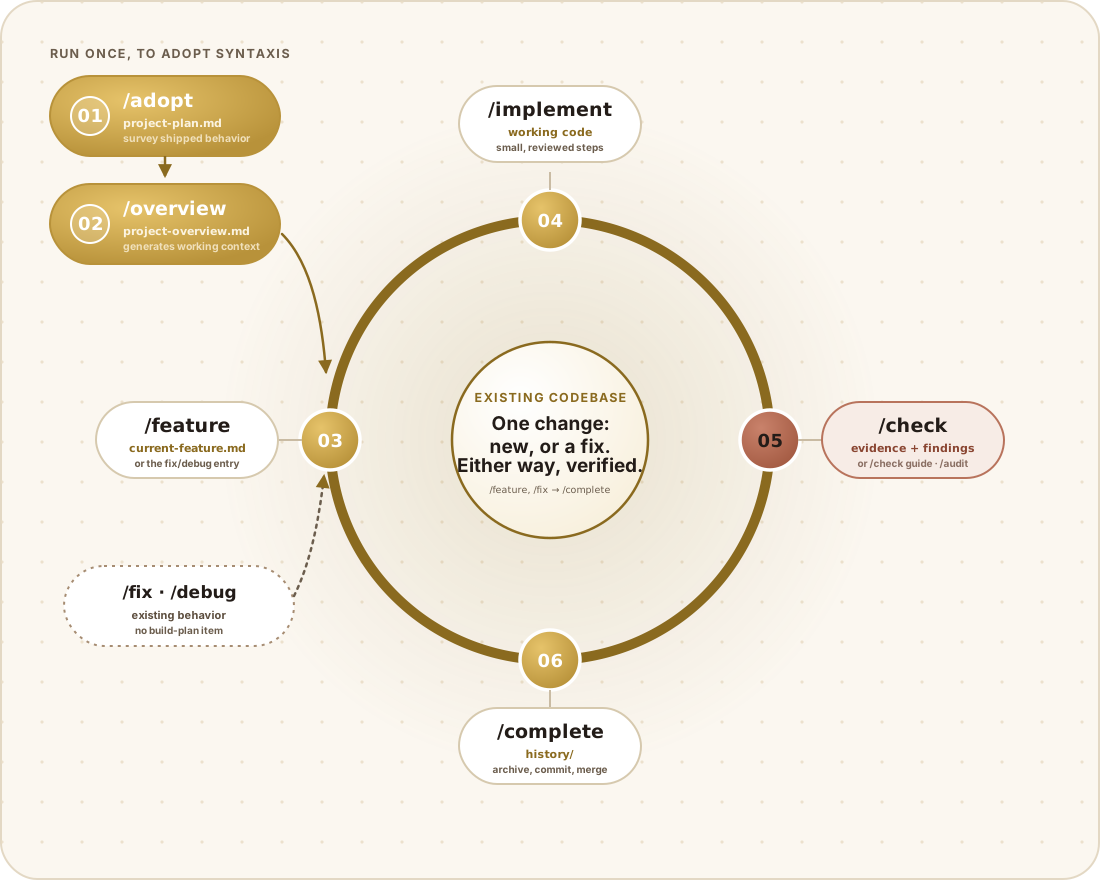
How the diagram works
Section titled “How the diagram works”This is the core workflow diagram with one real difference: the setup chain generates its own inputs instead of waiting for you to write them, and the ring gains a second, dashed way in. Same shape, same ring, same gate — the shipped code just changes what feeds it.
Setup — run once, to adopt Syntaxis
Section titled “Setup — run once, to adopt Syntaxis”01 · /adopt. Where this diverges from a fresh project: instead of you
writing syntaxis/project-plan.md by hand, /adopt surveys what the
application actually does — real routes, real data, real behavior — and
writes the plan from that. syntaxis/build-plan.md comes out of the same
survey with shipped features already checked off, not queued as work to redo.
Nothing here is invented; if the code doesn’t clearly show a feature’s intent,
that gap gets flagged for you to fill in rather than guessed at.
02 · /overview. Identical to the fresh-project diagram: it reads the
plans /adopt just generated and produces
syntaxis/context/project-overview.md, the context every later skill reads.
Its arrow feeds into 03 on the ring, exactly like a new project.
The ring — repeat once per change
Section titled “The ring — repeat once per change”03 · /feature. The main entry to the ring, same as a fresh project: one
build-plan item becomes a spec in syntaxis/context/current-feature.md, and
work stops for your approval before anything changes.
The dashed pill below it — /fix · /debug — is the second way in, and it’s
the part this diagram adds. A brownfield codebase accumulates small, unplanned
corrections that don’t belong on the roadmap as numbered features: a confirmed
bug, a small unplanned change, behavior nobody wrote a build-plan item for.
/fix specs that directly; when the cause isn’t known
yet, /debug isolates it first and hands the result
to /fix. Both write the same current-feature.md file /feature would
have written — which is exactly why the dashed arrow merges into node 03
instead of drawing its own lane around the ring: from here on, a fix and a
feature are built, verified, and completed identically. The border style is
the only thing marking it as an alternate entry rather than a numbered step —
it carries no build-plan item, so it never advances the roadmap’s numbering.
04 · /implement, 05 · /check (rust, the proof step, with
/check guide and /audit as its named companions), and 06 · /complete
run exactly as they do in the core workflow — nothing
about verification or completion changes because the work started from a fix
instead of a feature.
Where the ring closes
Section titled “Where the ring closes”As with a fresh project, /complete has no drawn arrow back to /feature —
finishing one change starts the next lap, and the next build-plan item or the
next confirmed bug both re-enter at the same node 03.
Install
Section titled “Install”cd my-existing-appnpx create-syntaxis@latestThe installer writes AGENTS.md, CLAUDE.md, the adapter trees, and
syntaxis/ — your README.md, source, and configuration stay exactly as
they were.
/adoptIt looks at what the application is actually doing and generates:
syntaxis/project-plan.md, drawn from the real product surfacesyntaxis/build-plan.md, with shipped features already checked offsyntaxis/context/coding-standards.md, from conventions actually in use- The real commands, written into
AGENTS.md - Adapter and visibility setup
The real difference from onboarding a fresh project: shipped work gets recorded as done, not queued up as something to rebuild.
Check over what it generated
Section titled “Check over what it generated”Adopt is working from inference, and inference isn’t certainty. Worth confirming:
- Did it capture the features that actually matter, at a sensible level of detail?
- Do the standards reflect your real conventions, or a tidied-up version of them?
- Are the commands right, working directories included?
- Is anything important missing simply because the code never made it obvious?
Fix the files directly wherever it’s off. They’re yours now.
Generate the overview
Section titled “Generate the overview”/overviewThen work normally
Section titled “Then work normally”/feature → /implement → /check → /audit current → /completeBringing QA into a codebase that already ships
Section titled “Bringing QA into a codebase that already ships”A brownfield project almost always has untested corners, and the honest first move is deciding where testing actually goes rather than promising to cover everything at once:
/test-planIts risk-based priority section is doing the real work here. From there, design cases for whatever’s riskiest first:
/test-cases checkoutDon’t try to backfill an entire suite in one go. Cover whatever would hurt most if it broke, and write down plainly what you’re deliberately choosing not to test yet.
A useful place to start
Section titled “A useful place to start”/auditA full-project audit gives you an honest baseline of what’s already there.
Findings land in the ledger, and you decide what’s worth acting on —
accepted, with your reasoning recorded, is a perfectly legitimate outcome
for plenty of them.