A spec draws the line
One feature, one spec, one list of things it has to satisfy. It gets written up first and held for your approval — nothing gets implemented against a spec you haven't read.
 Syntaxis
Specs first, evidence always
Left to chat alone, an agent's plan lives nowhere but the conversation, three half-finished features blur into one diff, and "done" gets asserted with nothing behind it. Syntaxis runs one feature at a time through skills that plan, build, verify, and test it — writing every decision to a file in your repository instead of to scrollback that vanishes with the session.
npx create-syntaxis@latestNothing built yet? npx create-syntaxis@latest --scaffold stands up the app first.
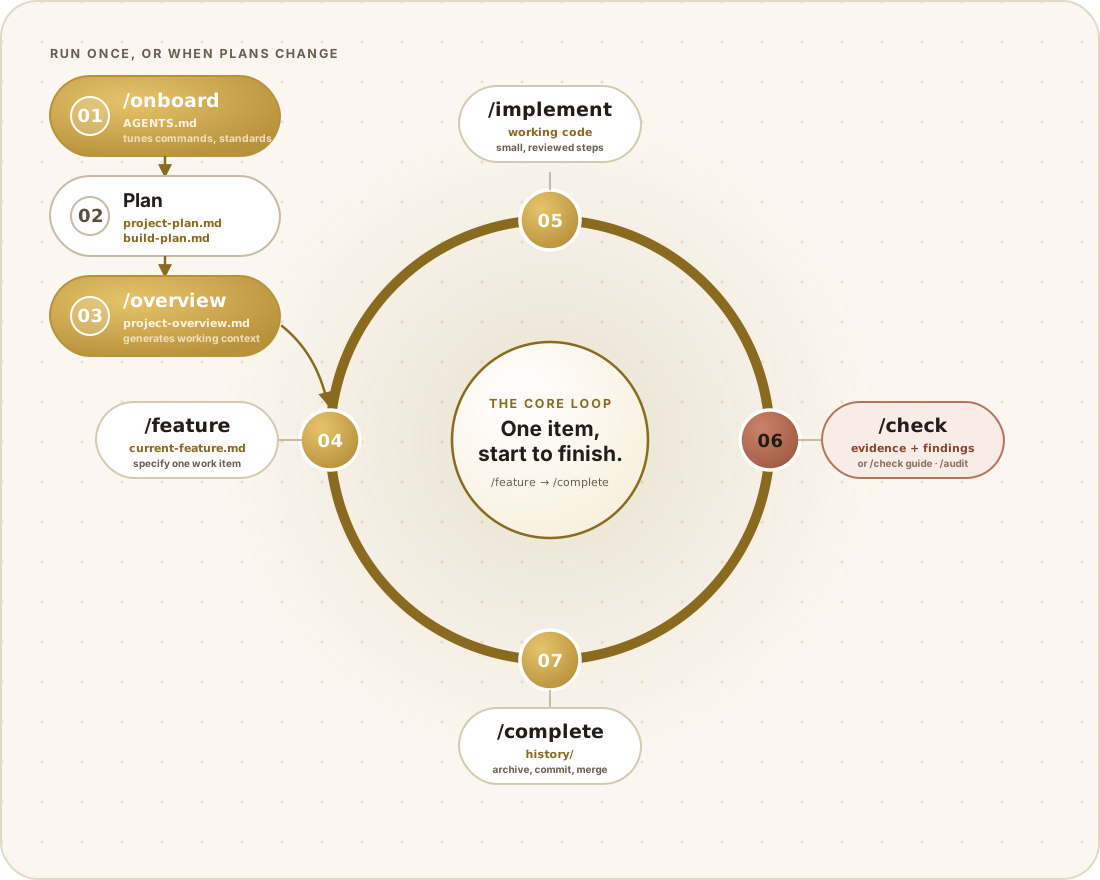
Five commands, each with exactly one job, and each one stopping the moment it hits a decision that's actually yours to make.
/featurePulls the next build-plan item into a spec, then stops and waits for your sign-off.
/implementWorks through the approved spec in small steps you can watch, then explains what it did.
/checkDrives the running app itself against the spec's done-when criteria — no guessing.
/auditGoes through the branch delta and writes down anything worth flagging, each with an ID.
/completeRuns the closing gates, archives the work, and asks before it merges a thing.
A dedicated testing track runs the whole time next to the build loop, covering web and mobile alike. A failed case writes into the same ledger a code review does, so it blocks /completethrough a gate that's already there — not a second one you have to keep in sync.
/test-planLocks down scope, test levels, environments, target devices, and what exit looks like.
/test-casesDesigns cases with durable TC ids, each one tracing back to a real requirement.
/automateTurns stable cases into web or mobile specs, checking first that each one can fail.
/test-runRuns a cycle, records what happened, and files every failure as a finding.
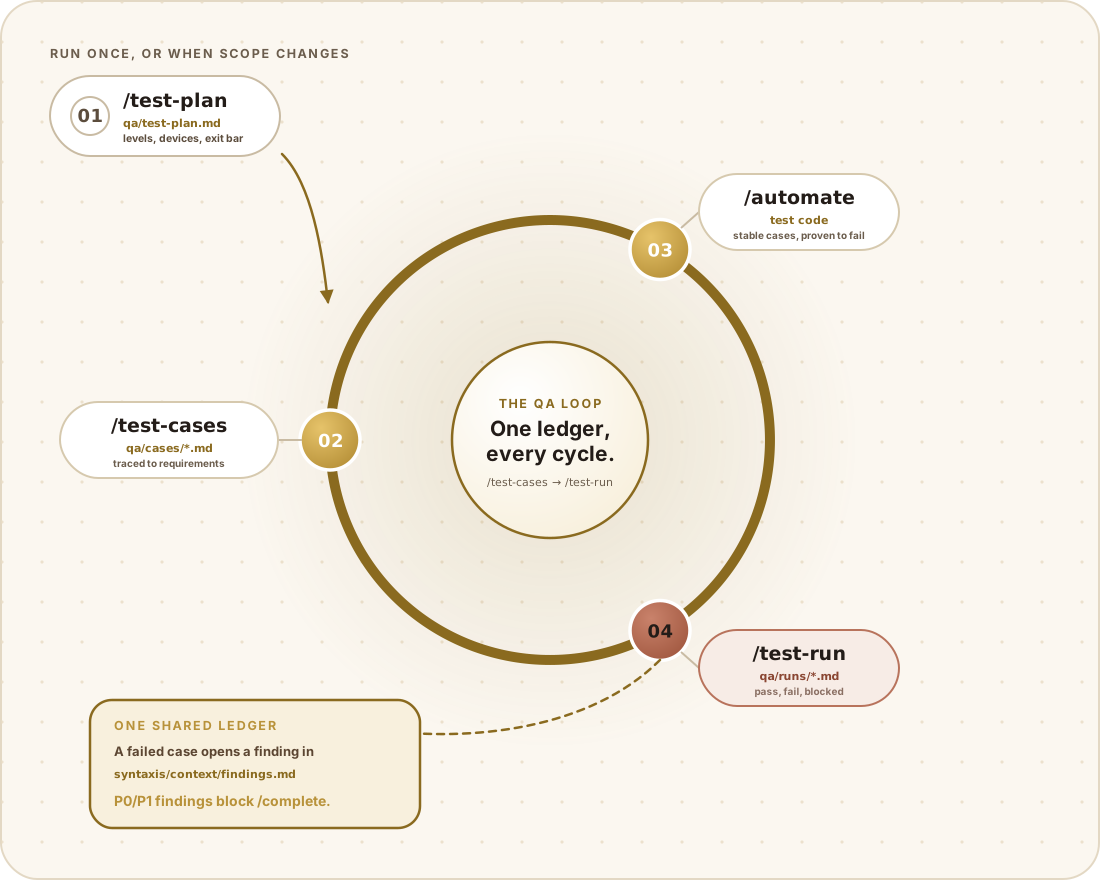
/test-plan settles scope once. The ring after it runs every cycle, and a failure always lands in the same findings ledger/audit writes to./scaffold calls the stack's own real generator instead of hand-rolling a skeleton, then writes down whatever commands it actually produced. It builds into a temporary directory first and merges the result, which is exactly what lets it add a stack to a repository that already has files in it.
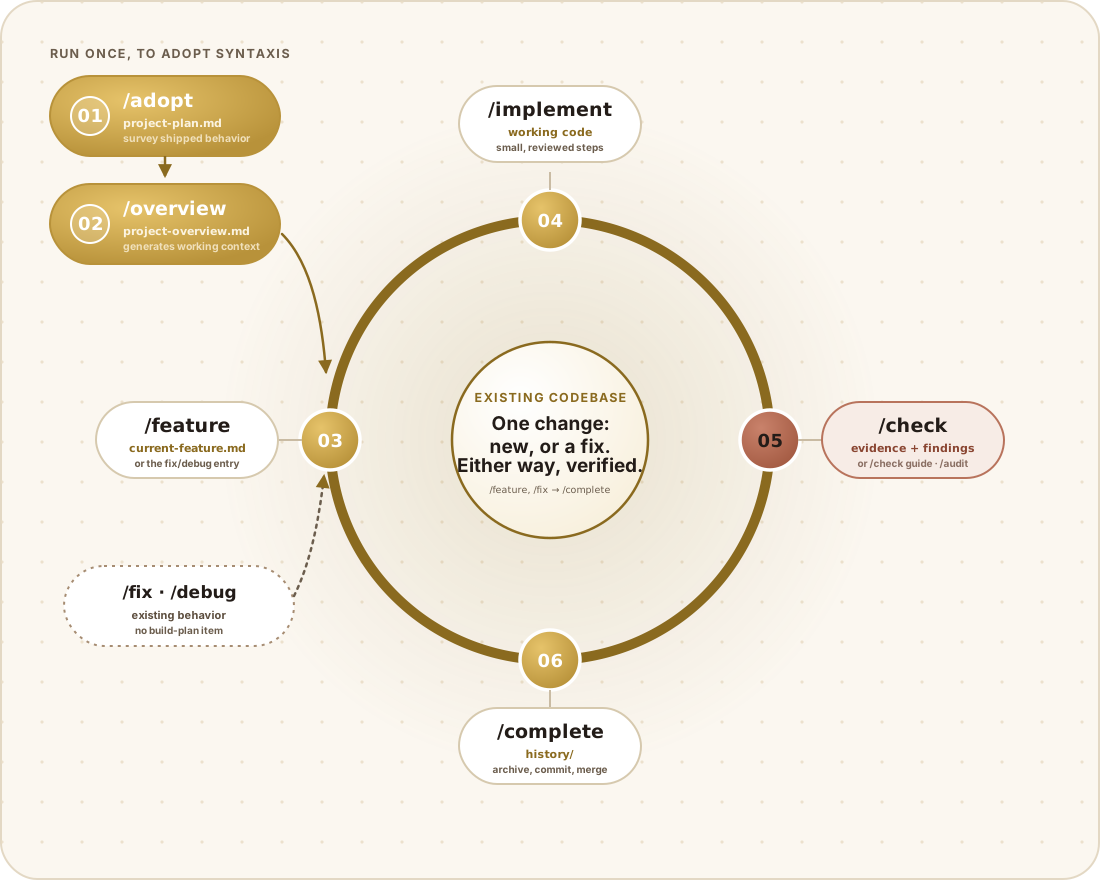
Swap /adopt in for /onboard and it surveys what the code is actually doing, then builds the plans and standards out of that — shipped features show up on the build plan already checked off, not sitting there as work to redo. Everything after that is either a new build-plan feature or a fix to something that already exists, and both get built, verified, and completed the exact same way.
Close the window, wipe the context, switch to a different AI tool entirely — the project's actual state doesn't go anywhere. It's sitting in files you can read and put in front of a reviewer.
syntaxis/
├── project-plan.md          what you are building, and why
├── build-plan.md            ordered features with stable numbers
├── config.json              workflow policy you own
├── context/
│   ├── project-overview.md  generated source of truth
│   ├── current-feature.md   the one thing being built now
│   ├── coding-standards.md  your conventions
│   ├── qa-standards.md      your QA conventions
│   └── findings.md          the findings ledger
├── qa/
│   ├── test-plan.md         scope, levels, exit criteria
│   ├── cases/               designed cases, durable TC ids
│   └── runs/                cycle records with evidence
└── history/ completed work, immutableOne feature, one spec, one list of things it has to satisfy. It gets written up first and held for your approval — nothing gets implemented against a spec you haven't read.
Plans, specs, findings, test cases, and finished history all end up as plain markdown in your repository, so none of it disappears the moment the conversation does.
"It works" means someone watched it work against the real running app. A pipeline going green isn't behavioral proof, and a passing suite says nothing about the paths it never touched.
Committing, merging, pushing, deploying, publishing, anything destructive — all of it waits on your explicit yes. Configuration can make that stricter. It can't make it looser.
No — Syntaxis stays beside your code, not inside it. It never chooses your libraries and never writes your architecture. When you want an actual application scaffolded, /scaffold calls that stack's own official generator to do it.
Claude Code and Codex get built-in slash and $ commands. GitHub Copilot, OpenCode, or any other agent that can read a file picks up the same markdown skills through AGENTS.md.
Not remotely. Five commands are all the build loop needs. Testing, CI, the QA track, and deployment readiness are opt-in extras — a project that has no use for one of them simply never runs it.
Run /adopt where you'd otherwise run /onboard. It surveys what's actually shipping and builds the plans and standards from that, instead of asking you to start from a blank slate.
npx create-syntaxis@latest