

The Build Loop
Five commands cover the development cycle:
/feature → /implement → /check → /audit current → /complete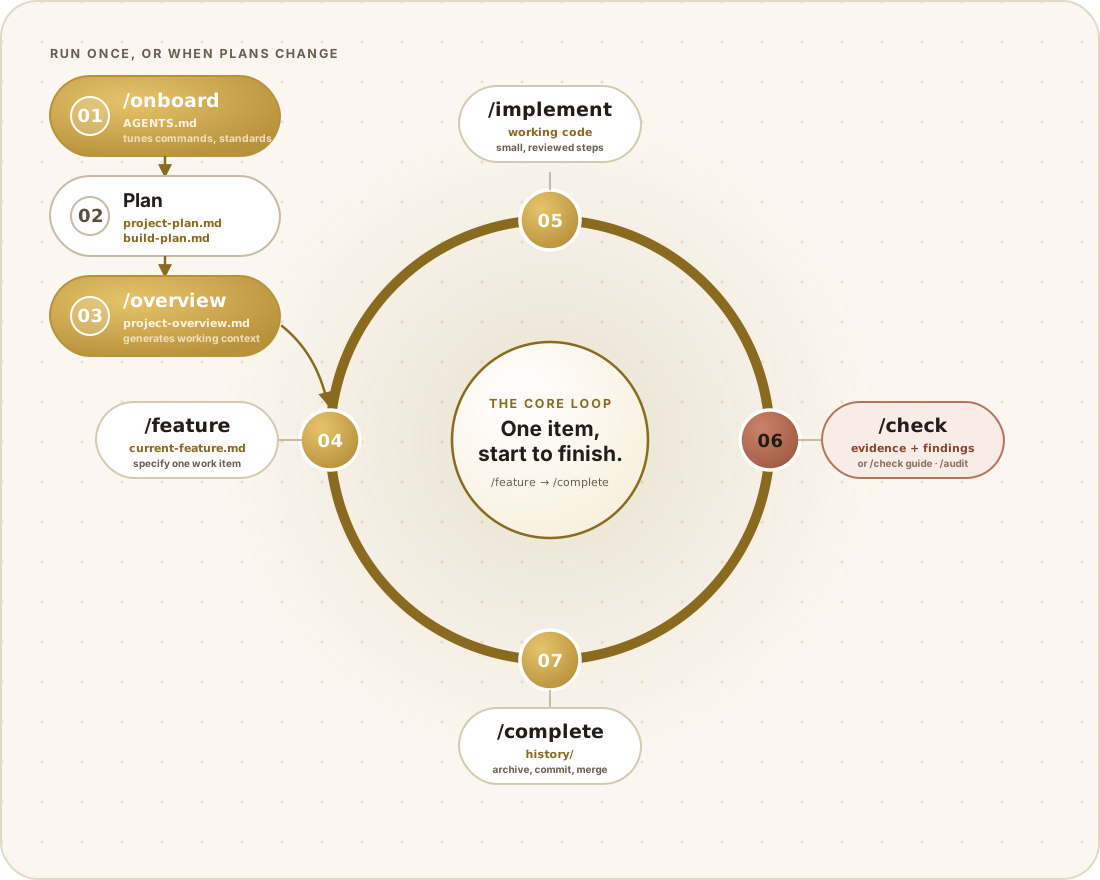
Each has a narrow job and stops where your judgement is needed.
How the diagram works
Section titled “How the diagram works”The diagram has two parts, and they run on different clocks. The chain on the left (01–03) runs once per project, or again whenever the plans change materially. The ring on the right (04–07) runs once per work item, for as many features, fixes, and rollbacks as the project has — every lap follows the arrows in the order drawn, and the step you finish becomes the input to the step you start next.
Setup chain — run once, or when plans change
Section titled “Setup chain — run once, or when plans change”01 · /onboard. The first thing you run after installing Syntaxis into a
fresh or early scaffold. It tunes the workflow to your real project: the
actual dev, build, lint, and test commands go into AGENTS.md; coding
standards get matched to your stack; you pick which tool adapters you use and
how much step-by-step review you want. Nothing before this point is
project-specific — onboarding is what makes it so.
02 · Plan. Not a command — this is you, writing two files directly (or
developing them through the optional /discovery
conversation): syntaxis/project-plan.md (what you’re building, for whom, and
why) and syntaxis/build-plan.md (an ordered feature list with stable
numbers). This is the one part of the whole diagram with no agent in the loop
— the product decision is entirely yours.
03 · /overview. Reads both plans and generates
syntaxis/context/project-overview.md, the durable context every other skill
reads before it acts. It also formats the build plan into a tracked checklist
without touching its wording, order, or existing item numbers. Re-run this
step — and only this step — when a plan changes in a way that matters; that’s
why the box is labelled “run once, or when plans change” rather than “run
once, ever.” Its arrow feeds straight into 04 on the ring.
The ring — repeat once per work item
Section titled “The ring — repeat once per work item”04 · /feature. Turns the next build-plan item into a spec in
syntaxis/context/current-feature.md: scope, small ordered steps, and
done-when criteria written as things you can observe, not intentions. It
stops here. Review and approve the spec before anything is built — this is the
single most important gate in the whole loop, because everything downstream
inherits whatever the spec got wrong.
05 · /implement. Builds the approved spec in small, visible steps on its
own branch, running the project’s Verify command wherever one is documented.
It ends with an optional read-only code walkthrough regardless of how much
step-by-step review you configured — you can always ask what it built and why.
06 · /check. Drawn in rust because it’s the proof step, not a build
step: it exercises the running application against the spec’s done-when
criteria and records what it actually observed. This is what separates “the
build is green” from “the feature works.” The pill also names its two
companions, both optional: /check guide produces a read-only walkthrough for
a human to try instead of the agent, and /audit reviews the branch delta
for quality, security, and performance defects — recording anything it finds
in the findings ledger with a durable ID and
severity. A clean audit doesn’t prove the app works, and a passing check
doesn’t prove the code is sound; they’re answering different questions, which
is why both feed the same node instead of getting their own.
07 · /complete. Runs the final gates — refusing while any P0 or P1
finding is open or fixed — archives the spec and any test-run records under
syntaxis/history/, updates the build plan’s checkmarks, creates the work
commit, and asks before merging.
Where the ring closes
Section titled “Where the ring closes”There’s no arrow drawn from /complete back to /feature — the ring itself
is that connection. Finish one lap, and the next one starts at /feature
with the next build-plan item, indefinitely, for as long as the project has
planned work. A failed /check doesn’t exit the ring either: you fix the code
and check again, handing off to /fix or
/debug below when the cause needs isolating first.
This walkthrough isn’t a gate policy in itself
Section titled “This walkthrough isn’t a gate policy in itself”Walking through /audit here doesn’t make it mandatory. Audit, check, and
the manual-guide path all still default to manual; independent review
still defaults to when-sensitive on its own. Change any of that from
Project Configuration.
Other doors into the same loop
Section titled “Other doors into the same loop”| Situation | Command |
|---|---|
| Something small and unplanned, or a bug you’ve confirmed | /fix |
| Something’s broken and you don’t know why yet | /debug |
| Undo a completed feature without losing its record | /rollback |
| Weigh an idea against the real code before committing to a plan | /explore |
| Understand a planned feature before writing its spec | /brief |
Whichever door you come in through, you end up in the same control loop: a spec you approve, an implementation you can watch happen, and proof before anything gets marked complete.
Keeping things proportional
Section titled “Keeping things proportional”One rule governs every planning and build step: build for what’s actually required right now, not for scale nobody has asked for yet.
- When scale is unknown, the smaller, more reversible design wins by default.
- A new abstraction, dependency, service, configuration surface, or security mechanism only gets added against a current requirement — never a hypothetical future one.
- Real trust boundaries hold regardless of how small the project is: untrusted input, auth and ownership, shared persisted data, destructive operations, payments, secrets, sensitive data.
Where QA fits into all this
Section titled “Where QA fits into all this”The QA loop runs the whole time right alongside this
one. Its cycle records feed defects into the exact same findings ledger, so
a failing test blocks /complete through a gate that’s already there.
When you want some of this automated
Section titled “When you want some of this automated”Two opt-in modes will automate bounded local work without loosening any safety boundary:
/autopilot— folds spec-writing and implementation into one pass for a single item, carries through the usual spec-approval stop, then halts before completion./continuous— works through reviewed build-plan items one at a time, using only local Git the entire way.
Neither one pushes, deploys, publishes, waives a finding, or settles a product decision that was never actually made.